Start with music.
A fresh installation opens with music only. The installer is the same for phones, tablets, car head units and televisions.
Free. Choose your device and download the player.
One APK for all four devices. Choose your Edition in Settings.
 Your music.
The full set is shown here. A fresh installation starts with music only.
A video introduction to Lira. She is not yet included in the current release.
An artistic machine based on Yuri's parable. It shows the application's features, not the physical construction of a phone. The light path is illustrative; the player's audio is not processed here. Lira has a video introduction with sound.
A parable from Yuri, the creator of SHIKARDOS: there is one engine. You choose the wheels, mirrors and body yourself.
A fresh installation opens with music only. The installer is the same for phones, tablets, car head units and televisions.
On phones and tablets, select the sections you want. Equalizers have their own group. Without them, the equalizers' audio components do not even start.
Clearing a checkbox hides a section from the screen. Your data stays. Updates preserve your previous selection.
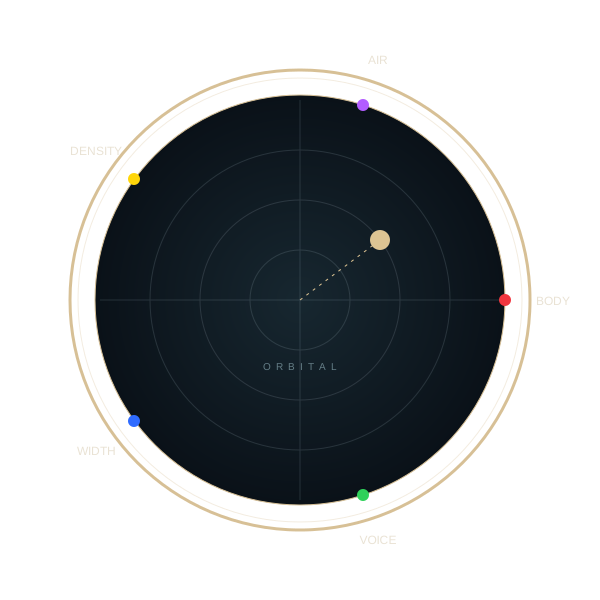
Move the point on the Orbit: direction chooses the blend of sides, distance from the center sets its strength. Seven gray and five colored keys explain the principle; FLOW shows movement over time.

We are preparing a musical intelligence you can talk to. She will arrive when her voice and mind are ready.
Lira is not yet in the current release. She will be optional. We are not promising a release date.
Meet Lira →Phone, Tablet, Car, TV, Remote. Select one in Settings, in the Edition row.
Player and Watch Editions are in preparation. Windows is a separate beta, with an update being prepared.
Adds weight and depth to low frequencies. Learn where to enable the control, how to choose its strength and how to avoid booming bass.
How to adjust bass →CRYSTAL — clarity and high frequenciesChanges the brightness of the sound: vocals, cymbals and small details become more noticeable. Adjust its strength without excess harshness.
How to adjust high frequencies →VULAN — audio engineDirect audio output to an external USB DAC. How to connect the device, choose bit depth and check the signal path.
How to connect and configure a USB DAC →